When choosing a keyword finder tool, evaluate the accuracy of search volume data, the depth of databases for your target geo, the ability to find long-tail keywords and questions, the cleanliness of the data from spam, the adequacy of KD difficulty estimates, and the quality of clustering.
I tested many tools and compiled a list of the most effective services for working with keywords, from specialized solutions to large SEO platforms.
Keyword Research Tools

Top 12 Keyword Research Tools
- KeywordStat: A new tool for Keyword Research and the leader of our ranking for UI, data filtering accuracy, intent analysis, and AI clustering at a minimal monthly price.
- Semrush: The main all-in-one SEO analytics platform with a colossal database covering different geos and a high price point.
- Ahrefs: Highly accurate, time-tested SEO analytics with an excellent keyword database for the US, a high price, and a click-based limits system.
- SE Ranking: A balanced SEO platform offering a clean interface, conservative, smoothed data, and a lower price.
- KWFinder by Mangools: An aesthetic service designed for quickly finding low-competition phrases with very realistic KD and a pleasant price.
- SpyFu: An ideal service for competitive intelligence and PPC spying, perfectly filtering out informational noise in favor of clean commercial traffic in the US.
- Serpstat: An affordable full-cycle platform with a relatively small database and not entirely accurate data for the US, but fairly high-quality data for Europe, an outdated tabular workflow, and a very attractive price.
- Ubersuggest by Neil Patel: Budget software from Neil Patel with a modern design and convenient AI features, but it distorts data and the actual difficulty of SEO promotion.
- Keyword Tool keywordtool.io: A professional multichannel autocomplete parser, indispensable for alternative platforms such as Amazon, YouTube, and TikTok.
- Keywords Everywhere: A popular solution for quick semantic analysis on the fly with excellent fast filters above tables.
- Wordtracker: An independent SEO market tool that fundamentally does not depend on Google’s monopoly and calculates a unique Keyword Effectiveness Index (KEI).
- Moz Keyword Explorer: An old industry tool with excellent search volume ranges and a unique organic CTR scoring system.
Features to Consider When Choosing a Keyword Research Tool
Choosing keyword research tools always comes down to your budget and your actual tasks. It is important to understand whether you need to overpay for extra features or choose a tool strictly for completing a specific task.
Most services on the market are usually divided into two types: large, multifunctional SEO platforms and specialized tools.
Their main difference is in the accuracy and sources of their data. All-in-one platforms rely on their historical databases and clickstream data, while specialized tools most often parse autocomplete suggestions, use Google Keyword Planner data, and use AI for clustering.
To make it easier for you to make a decision and avoid wasting time choosing, I tested and broke down the best keyword tools for different tasks and budgets.
TOP Keyword Research Tools in 2026
1. KeywordStat: The Best Tool for Price-to-Quality Ratio
KeywordStat is the main discovery and the benchmark for what modern SEO software should look like. This tool has pushed long-standing industry leaders aside by offering data accuracy on the level of the world’s best databases, while completely eliminating the heaviness, overload, and unjustified expense of older platforms.
Website: https://keywordstat.co
KeywordStat Interface
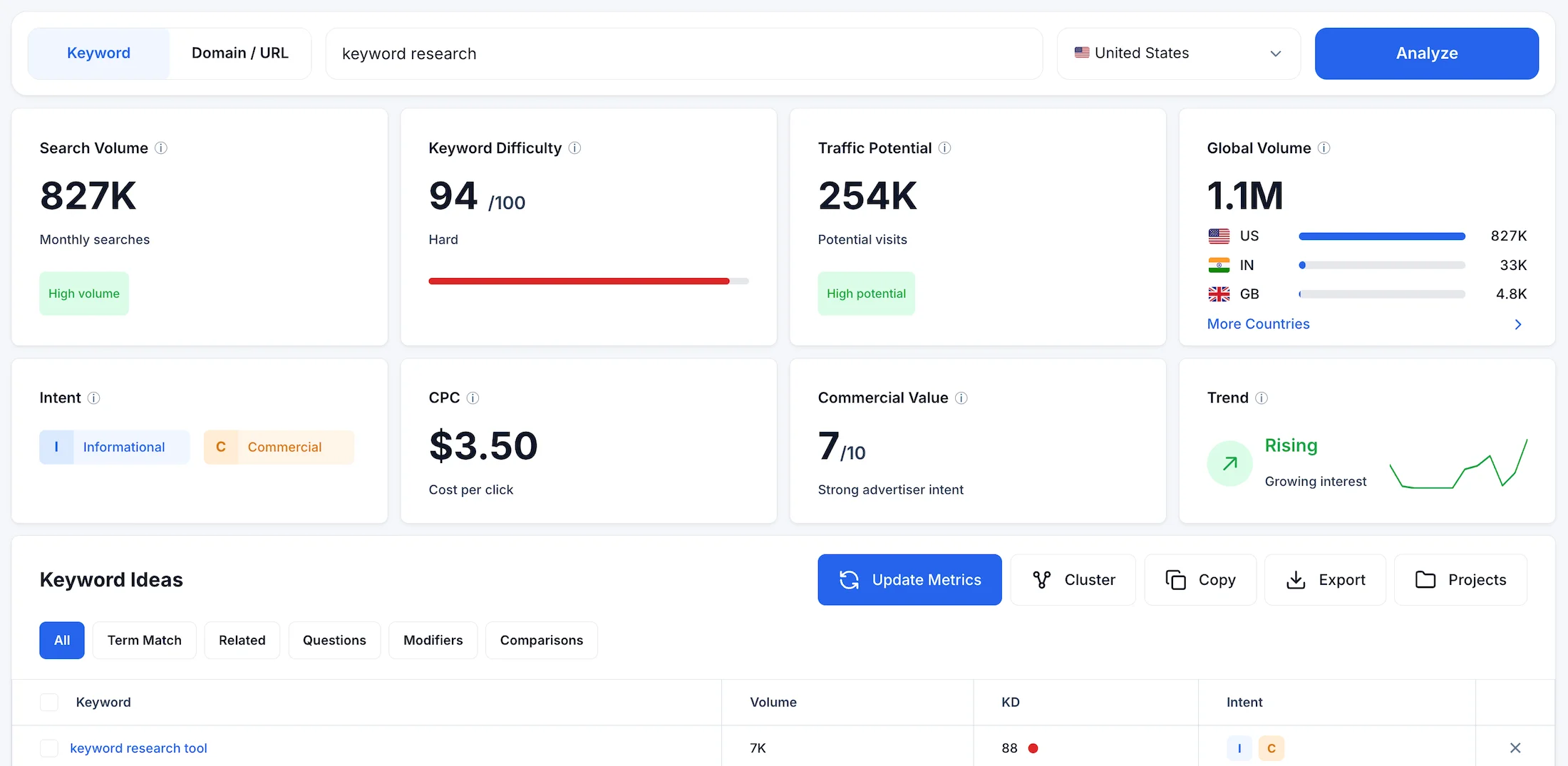
Data Quality and Anomalies
During our cross-test on one of the most difficult B2B queries in the US, keyword research, the KeywordStat algorithm demonstrated high accuracy, delivering a clean organic search volume of 827,000 searches per month. The service uses smart filtering algorithms that eliminate artificial inflation and junk search phrase combinations, providing marketers with the real market capacity.
Keyword Difficulty KD: The difficulty score of 94/100 Hard is absolutely adequate in this niche: billion-dollar corporations are competing in the US, and the tool honestly warns about this with a red marker.
Traffic Potential: The traffic potential metric of 254,000 clearly shows the total volume a page can receive, taking into account Long-Tail queries, if the page reaches the top 1.
Global Volume: Clear distribution by country, US 827K, India 33K, helps instantly assess geographic priority.
Interface Usability and Workflow
The KeywordStat interface is visual perfection in the style of minimalist widget cards, created for quick visual scanning. Unlike competitors that force you to scroll three screens down, everything important here is collected in one panel.
Quick Action Panel: The Update Metrics button provides instant refresh of the search volume cache here and now, while Copy, Export to CSV/Google Sheets without broken encodings, and Projects, the built-in semantic manager for different sites, are all right in front of you.
Keyword Ideas: Brilliant tab separation. Instead of an endless wall of text, you can switch with one click to Questions, real user questions from Google for ready-made H2/H3 subheadings; Modifiers, commercial and local modifiers such as best, online, free; and strategic Comparisons, queries with the conjunction vs, ahrefs vs semrush, which bring the highest-converting and hottest traffic.
Search Intent & AI Features
KeywordStat is one of the few tools on the market that flawlessly recognized the dual nature of the test query.
Older competitor algorithms blindly marked it as informational. KeywordStat, however, displayed the colored Informational and Commercial tags, proving that people are not just looking for articles but are ready to buy software. This is confirmed by the high Commercial Value of 7/10 and CPC of $3.50.
But the main killer feature is the Cluster button — the famous AI Clustering, which is what KeywordStat became known for. The built-in AI algorithm groups thousands of scraped keywords with one click based on their actual meaning and similarity of search results SERP. This completely eliminates the need to spend hours manually sorting rows in Excel.
Pricing Policy and Limits
KeywordStat’s pricing structure looks very attractive compared to competitors.
Free Plan $0: Completely free access forever. Provides 5 full analyses per day with up to 250 keywords per analysis. Most importantly, the tool does not cut metrics, providing all 8 indicators, including standard export and clustering, which is unique in the market.
Pro Plan $9/month: You get a full-fledged workhorse: 100 full analyses per day, up to 5,000 keywords per analysis, unlimited clustering, export, and priority AI processing speed.
No hidden payments or credits for clicks. Agree that this looks practically perfect.
But let’s not get ahead of ourselves and praise this tool too much. It is still a newcomer to the market, although a very bold one.
KeywordStat is limited to keyword research only and does not have other features that an SEO specialist needs, such as keyword tracking or link building.
Also, Domain / URL search works very limited and simply shows Primary keyword and Secondary keywords in a very limited format. There are Opportunities and Content gaps features, but they work more in a recommendation format. Competitors have a much more interesting implementation of this functionality.
2. Semrush Keyword Magic Tool — The Leading Western SEO All-in-One
Semrush firmly holds its position as a leader among comprehensive, all-in-one SEO platforms. Its flagship Keyword Magic Tool module is perhaps the largest database of search queries for the US available on the market, making it indispensable for global competitor analysis and large-scale PPC advertising campaigns Semrush.
Website: https://www.semrush.com
Semrush Interface
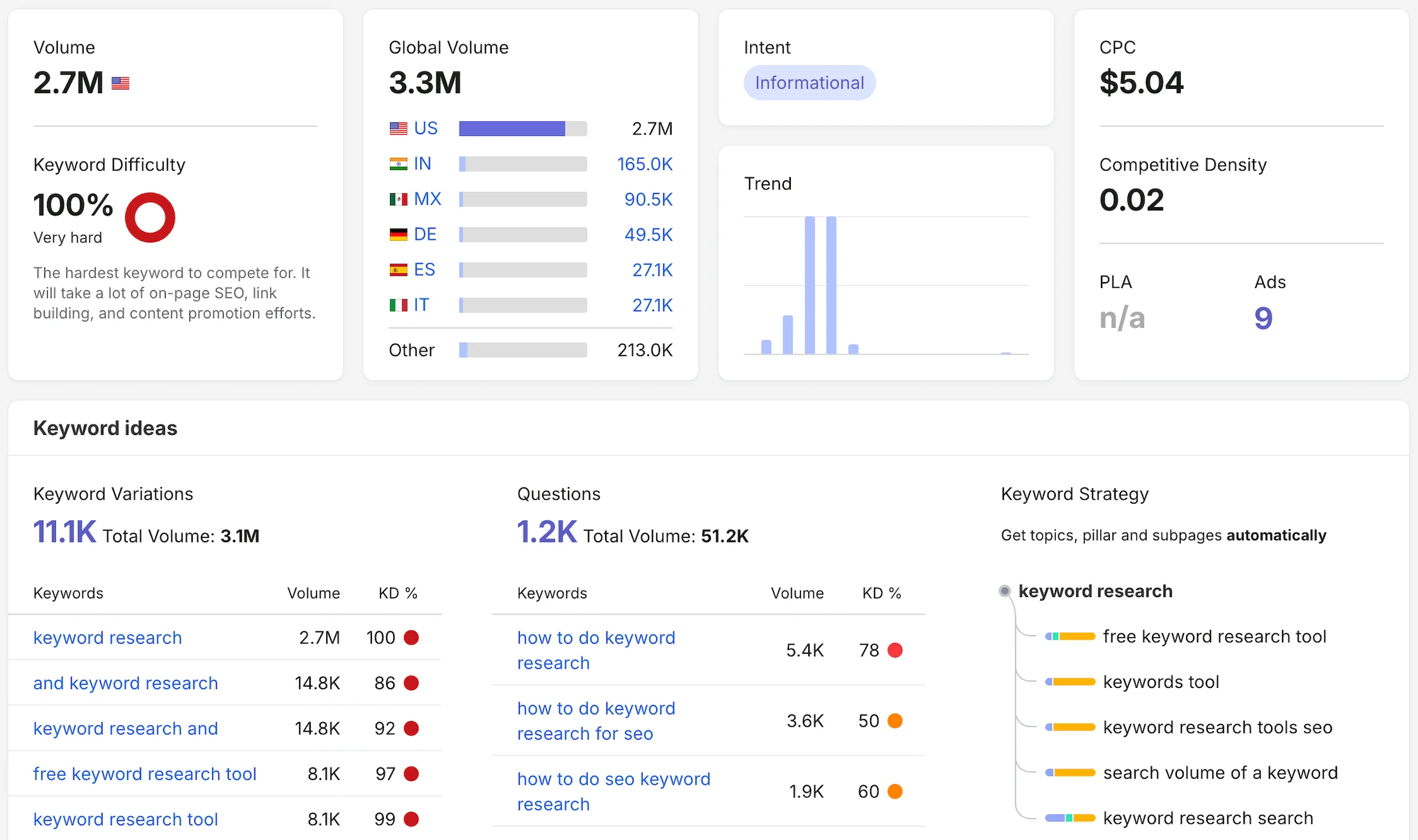
Data Quality and Anomalies
During our experiment, Semrush proved to be the market’s biggest Optimist. For the test query keyword research, it returned a colossal search volume of 2,700,000 phrases per month, which is almost three times higher than the cleaned organic data from competitors at 827K.
Why does this happen? Semrush algorithms often use broad aggregation of similar-intent phrases, as well as mixing data from contextual advertising impression forecasts into the overall statistics. For an SEO specialist, this is a trap: you can build a content plan based on million-plus reach that does not actually exist in organic search.
Keyword Difficulty KD: The difficulty score is pushed to the absolute maximum of 100% Very hard. Here, the tool is absolutely right: the niche in the US is dominated by corporate blogs.
Cost per Click CPC: The service showed the highest basic cost per click among SEO all-in-one platforms at $5.04, clearly demonstrating the aggressiveness of US advertisers in this niche.
Interface Usability and Workflow
The Semrush interface is a classic example of Data Vomit and information overload. Dozens of tables, charts, trends, paid search data, ad history, and PLA copies are displayed to the user simultaneously.
Interface Advantages: The Keyword Magic Tool module has a convenient left sidebar where keywords are automatically grouped into nested thematic folders based on modifier words. This allows you to quickly filter out entire blocks of unnecessary semantics.
Interface Disadvantages: Due to the overload, the dashboard works rather slowly. Finding the required button or configuring a custom filter requires a lot of scrolling and numerous clicks. Spending six hours a day in such an interface without a break is a serious strain on the eyes.
Search Intent & AI Features
Semrush automatically tags the intent of search phrases, but its algorithms often suffer from being too straightforward. In our test, the tool identified the intent of the keyword research query as purely informational Informational.
This is a serious miss: with a CPC above $5, it is obvious that users are not just looking for articles but are looking for commercial software. Because of this, you may overlook the transactional potential of the phrase.
Killer feature from the screenshot – The Keyword Strategy block at the bottom right. Semrush can automatically build a content hub structure in the form of a Mindmap, showing how subpages of your Site should branch out from one main high-volume keyword. This is a very cool feature for designing blog architecture.
Pricing Policy and Limits
The financial entry threshold for Semrush is one of the highest in the industry. The pricing structure is divided by functionality, forcing users to overpay for basic features.
SEO Plan $117.33/month when paid annually: The entry-level plan is artificially limited. You are locked into 5 Sites and 500 keywords per day, but most importantly, all AI analytics are completely blocked, including tracking your brand’s visibility in Google AI Overviews.
Starter and Pro+ Plans $165.17 and $248.17/month: Only on these plans do you get access to tracking performance in AI search, expanded project limits, and historical keywords data. For small teams, this already amounts to a serious $2,000–$3,000 per year for a single seat.
3. Ahrefs Keywords Explorer: The Highly Accurate Veteran with Strict Limits
Ahrefs is a cult platform among link builders and hardcore SEO specialists. Its Keywords Explorer module operates on a huge dataset of Clickstream click history from millions of real users, allowing it to provide deep analytics not only for Google, but also for YouTube, Amazon, Bing, and 6 more search engines.
Website: https://ahrefs.com
Ahrefs Interface
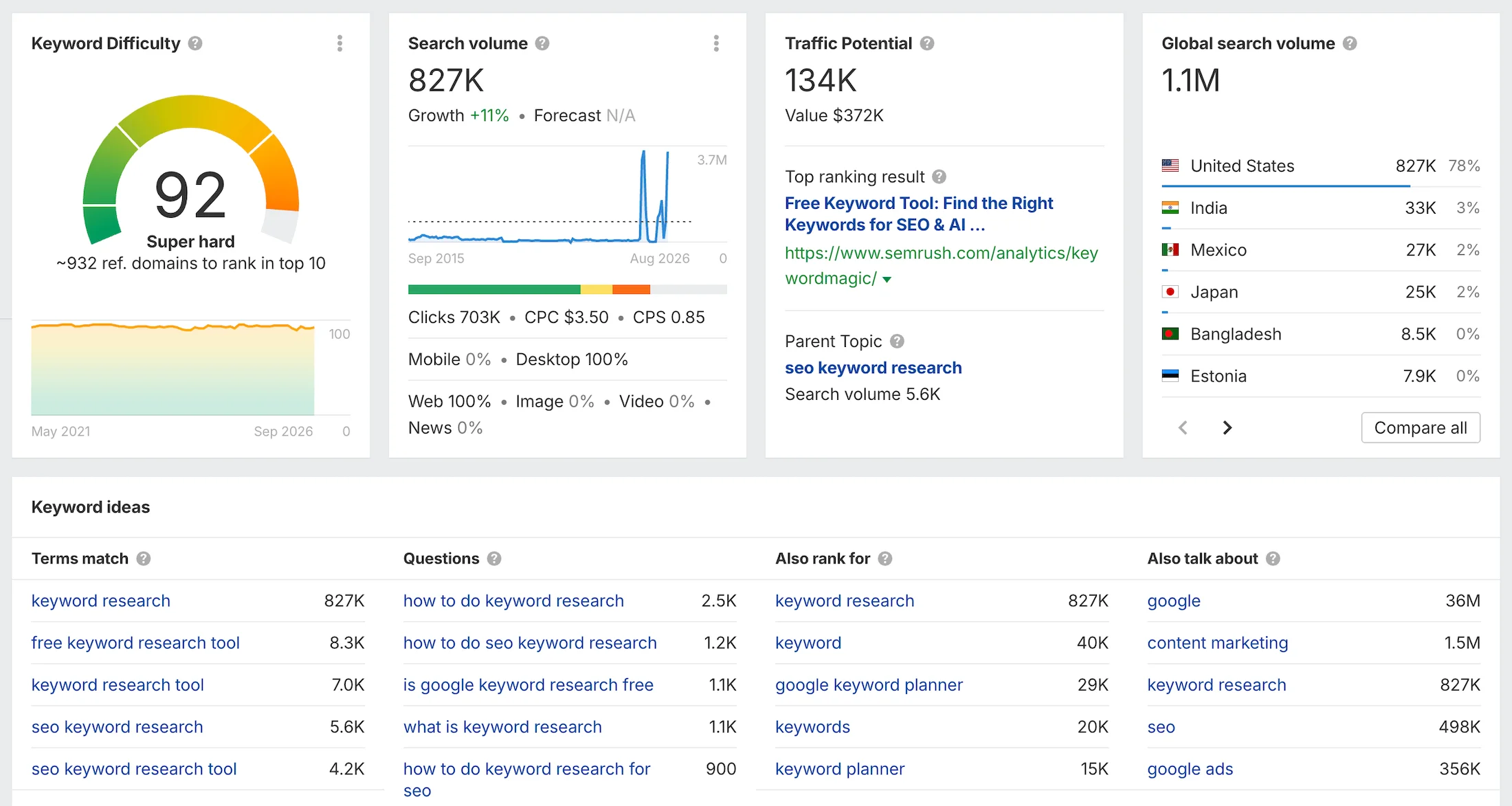
Data Quality and Anomalies
In our test, Ahrefs proved to be an Absolute Realist. For the keyword research query, its database returned exactly the same figures as KeywordStat: 827,000 searches per month in the US, while recording a global volume of 1.1M.
Keyword Difficulty KD: The difficulty score is 92 Super hard. The Ahrefs algorithm calculates KD using a unique formula: it looks at the average number of backlinks required to reach the top 10 Keywords Explorer. A score of 92 means you will need links from hundreds of trusted domains.
Traffic Potential: This is where an interesting conservative feature of the algorithm became apparent. Ahrefs estimated the traffic potential at only 134,000. It calculates this metric based on the traffic received by the current top-1 Site for this keyword. This is useful for protecting against inflated expectations, but it overlooks the Long-Tail that the page collects as a whole.
Cost per Click CPC: An ideal match with the ranking leader at $3.50.
Interface Usability and Workflow
The Ahrefs interface has not changed globally for many years, and against the background of modern utilities, it looks like an overloaded aircraft control panel.
Interface Advantages: Huge depth of technical metrics. Directly on the main dashboard, you can see graphs showing the distribution of Clicks vs Searches, the percentage of No-click searches, and even a detailed breakdown of the audience into Mobile/Desktop Keywords Explorer.
Interface Disadvantages: The information density per square centimeter of the screen is excessive. To extract simple keyword ideas, you have to navigate through a maze of complex graphs. The Keyword Ideas block at the bottom of the dashboard provides standard dry lists that are difficult to scan visually without first configuring five or six filters.
Search Intent & AI Features
Quick visual Search Intent markers are present on the main Keywords Explorer screen. They help you understand whether a nested keyword is informational or commercial.
Ahrefs is actively developing its AI consultant, Letaido. This is an artificial intelligence-based marketing platform that connects to tools and data, and its agents create reports, launch tools, and automate workflows.
Pricing Policy and Limits
Ahrefs’ pricing policy has been the most discussed topic in the SEO community lately. The platform tightly ties its pricing to the depth of historical data and the volume.
Lite Plan $129/month: The starter plan gives you only 5 projects and a modest 6 months of historical data. The tracking limit is 750 keywords. The main trap is the limit of 1,000 credits per user, which are deducted literally for every click, opening a new tab, or applying a filter in the interface.
Standard and Advanced Plans $249 and $449/month: These plans provide unlimited click credits within the interface, while the data history expands to 2 and 5 years respectively. Keyword limits increase to 2,000 and 5,000, but paying this much for a single seat is quite expensive for solo optimizers.
4. SE Ranking: A Balanced Alternative with Conservative Data
SE Ranking is positioned as a universal cloud-based all-in-one platform for those looking for a balance between price and depth of analytics. The tool offers an excellent position tracking module for Sites, a technical audit, and a full-fledged keyword research block.
Website: https://seranking.com
SE Ranking Interface
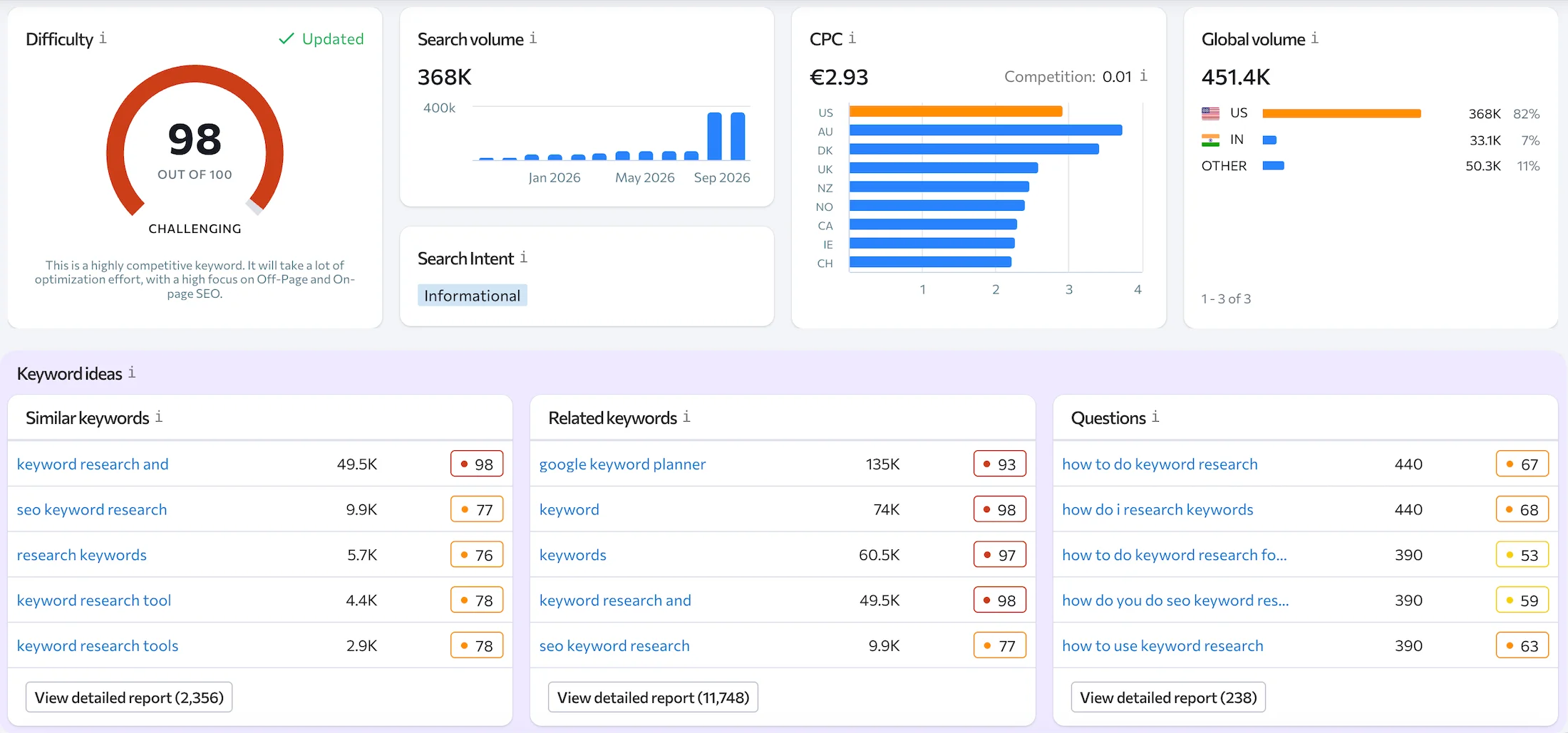
Data Quality and Anomalies
In our cross-test for the keyword research query, SE Ranking proved to be a Conservative Pessimist, returning a US search volume of only 368,000 queries per month.
Why does this happen? The SE Ranking algorithm largely relies on direct transmission of historical data from the official Google Ads Keyword Planner API as is, without applying deep Clickstream algorithms for cleaning and filtering, unlike KeywordStat and Ahrefs, which see 827K real searches here. If Google reduces or groups the statistics, SE Ranking simply passes this lower figure on to the user. The difference with Semrush at 2.7M was almost 7 times, and with KeywordStat 2.2 times.
Keyword Difficulty KD: The difficulty score is 98 / 100 Challenging. Here, the algorithm is absolutely accurate and harsh: it honestly warns the user that entering this top without a giant budget is pointless.
Cost per Click CPC: The service showed a click cost of €2.93, approximately $3.20 – $3.30, which is as close as possible to the real market rate of $3.50 recorded by the ranking leaders.
Interface Usability and Workflow
The SE Ranking interface is one of the neatest and most structured among large All-in-One platforms. The designers tried to move away from classic information chaos, making the dashboards clean and organized.
Interface Advantages: The CPC cost card is implemented exceptionally well. It is designed as a horizontal interactive bar chart that clearly shows how much this keyword costs in different English-speaking geolocations: US, AU, DK, UK. This is incredibly convenient for PPC specialists and contextual advertising specialists launching international campaigns.
Interface Disadvantages: The Keyword Ideas block at the bottom of the screen is divided into three standard columns: Similar, Related and Questions. Everything looks neat, but the interface lacks flexibility: you cannot switch between specific modifier tabs with a single click.
Search Intent & AI Features
SE Ranking automatically determines user intent, but in our test, the tool made the same mistake as Semrush. It marked the highly commercial keyword research query as purely informational Informational. The algorithm ignored the fact that behind this word lies a huge market for paid software, depriving the marketer of a signal about the phrase’s high conversion value.
Pricing Policy and Limits
Historically, SE Ranking was considered a budget solution, but recently the platform has made an aggressive price increase and introduced a paid add-on system.
Core Plan $103.20/month when paid annually: The starter plan now costs more than $100 per month. For this price, you get 10 projects and a tracking limit of 2,000 keywords. The main problem is that access to historical data is completely blocked on this plan: you can only see keywords in real time.
Growth Plan $223.20/month when paid annually: An agency plan expanding the limits to 30 projects and 5,000 keywords, where the history of keywords changes throughout the entire existence of the project finally becomes available.
Hidden AI Tax: The main disadvantage. The platform has turned trending features into paid add-ons. If you want to fully track your Site’s visibility in Google AI Overviews, Perplexity, and ChatGPT AI search, you will have to pay an additional +$71.20/month for the AI Search add-on. Need White-Label for clients? Then another +$69.00/month.
5. KWFinder by Mangools: An Aesthetic Long-Tail Keyword Hunter with AI Tracking Support
KWFinder was originally created for one task: making keyword research a simple and intuitive process, free from heavy technical SEO noise. Over the years, it has evolved into a full-fledged cloud dashboard that is ideally suited for generating ideas for Site content plans in the US Mangools KWFinder.
Website: https://mangools.com/kwfinder
KWFinder Interface
Data Quality and Anomalies
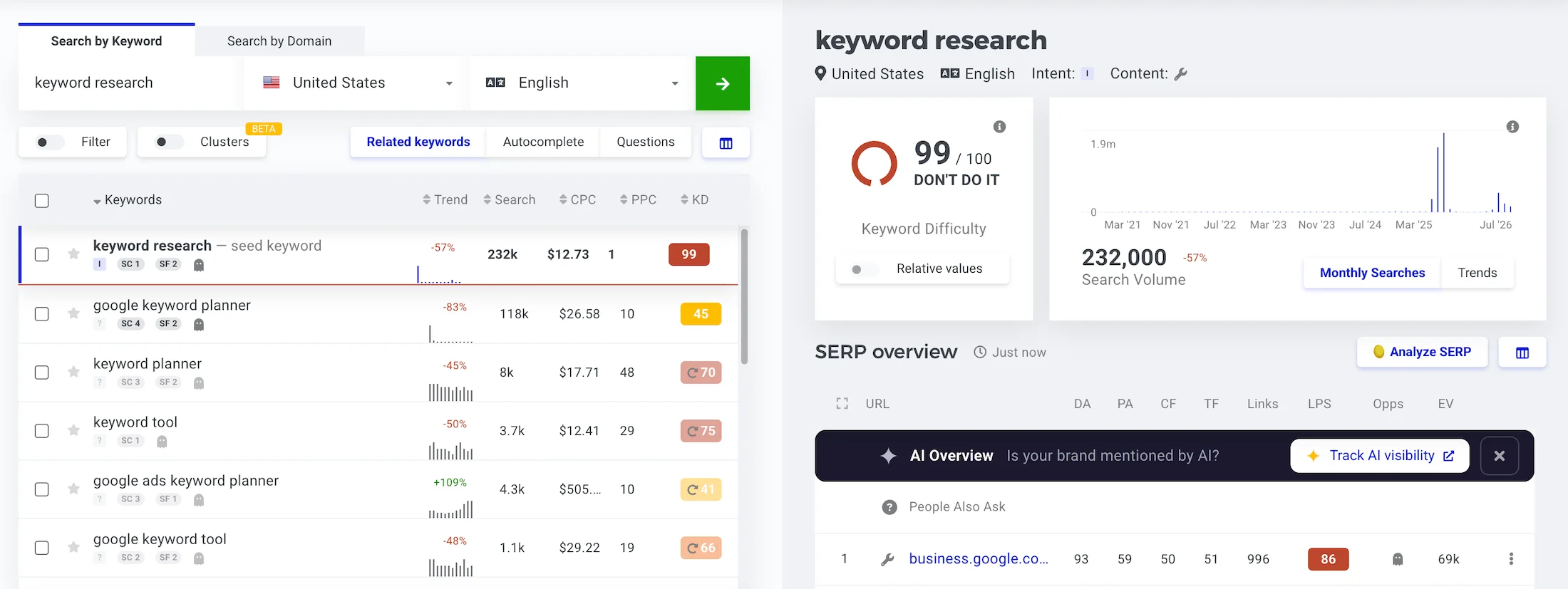
In our US experiment, KWFinder returned a search volume of 232,000 queries per month.
Why does this happen? Like most specialized tools, KWFinder uses a historical cleaned trend from the Google Ads API as its foundation. This figure almost exactly matches the values from WordStream 246K and Keyword Tool Pro 246K, confirming the common primary data source. Once again, we can clearly see how traditional algorithms underestimate real organic search: remember that KeywordStat and Ahrefs, using Clickstream, see 827,000 searches here.
Keyword Difficulty KD: The difficulty score is 99 / 100 DON’T DO IT. The KWFinder algorithm calculates difficulty based on the Link Profile Score of pages in the top 10. But the most important thing is usability. The service does not simply display a dry number, but directly writes on a bright purple background DON’T DO IT. Don’t even think about going here. This is an ideal indicator for beginners, protecting them from wasting budgets on empty niches.
Cost per Click CPC: The tool showed a high bid of $12.73. The KWFinder algorithm pulled aggressive peak advertiser bids in the US High Range, which is useful for assessing maximum commercial value.
Interface Usability and Workflow
The KWFinder interface has a very pleasant UX design. Here, the screen is divided into exactly two parts: on the left is a list of all found keywords and their metrics, and on the right is an instant deep analysis of the selected phrase. You do not need to scroll the page or jump between menu tabs at all.
Interface Advantages: Extremely smooth operation. The historical trend chart for the last 5 years and the detailed SERP Overview analysis block load instantly on the right screen when you click any word.
Clusters Tab Beta Version: The Mangools developers have finally recognized the automation trend and added an automatic clustering tab to the top panel. They are trying to catch up with the ranking leaders by offering keywords grouping to eliminate routine work in Excel.
Search Intent & AI Features
KWFinder does not have built-in textual intent tagging in the general table, which slows down the workflow slightly. However, it has made a huge technological leap in another area.
Killer Feature AI Overview & Track AI visibility: Pay attention to the lower part of the SERP analysis panel. KWFinder has integrated tracking of Google AI Overviews / SGE responses. The platform analyzes US search results and highlights whether Google generates an AI overview for the query, which Sites appear there, and whether your brand is mentioned by artificial intelligence. For SEO optimization under the modern realities of search engines, this is a critically important and unique feature.
Pricing Policy and Limits
Against the backdrop of rapidly increasing prices from competitors, the Mangools ecosystem maintains its status as one of the fairest and most cost-effective offerings, without forcing users to pay separately for AI modules.
Mangools Basic Plan $37.70/month when paid annually: An excellent starter plan for solo entrepreneurs. For this price, you get a strict but fair limit of 100 keyword research searches per day.
The main advantage is that the AI Search Watcher PRO module is already included, with 500 AI prompts for tracking visibility in ChatGPT, Google Gemini, and Anthropic Claude. The downside is that you cannot add additional employees.
Premium and Agency Plans $52.70 and $97.70/month when paid annually: Expand the limits to 500 and 1,200 searches per day respectively, unlock unlimited collection of suggestions, and allow you to add from 3 to 5 additional users to one account at no extra cost.
Mangools offers a powerful universal stack that is 3-4 times cheaper than Semrush or Ahrefs. And although daily limits of 100 searches on the entry-level plan can be restrictive for large-scale high-volume work, this is the best offer among “All-in-One” platforms, surpassed in value for pure keyword research only by KeywordStat with its fixed $9 per month.
6. SpyFu for Competitive Intelligence and PPC Spying in the US
SpyFu is a legendary and highly specific software of American origin. Unlike classic SEO all-in-one platforms, its algorithms were created for one specific task: complete reverse engineering of your competitors’ advertising budgets, ads, and hidden search strategies. If you need to get the maximum out of commercial keywords in the US, SpyFu is the main tool.
Website: https://www.spyfu.com
SpyFu Interface
Data Quality and Anomalies
On the provided dashboard, we caught the seventh unique data anomaly, which once again proves how different calculation algorithms are across the market.
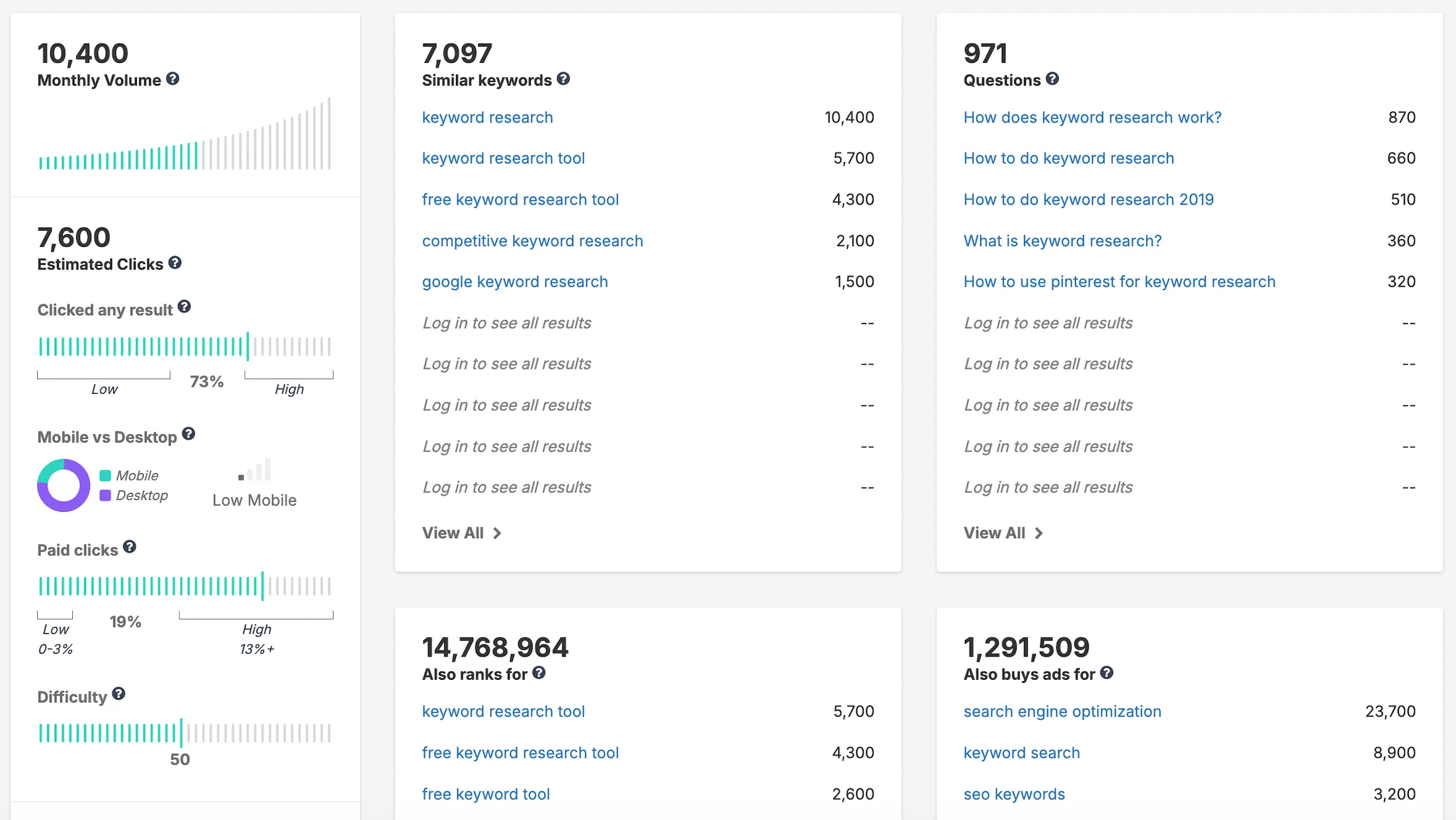
Monthly Volume: Search volume 10,400. What is the intrigue here?
Look at this figure: while KeywordStat and Ahrefs show broad organic search volume of 827K, SpyFu recorded a volume of only 10,400 searches.
Why does this happen? SpyFu aggressively cuts the data, filtering out all the informational noise from users who are simply looking for articles or definitions. Its algorithm leaves only active, commercially valuable traffic from users who are ready to take targeted actions.
Difficulty: SEO difficulty 50 / 100. This is already an anomaly: the tool assigns a difficulty of 50, while the ranking leaders push it to 92–99. Why? SpyFu calculates difficulty based on the cost of maintaining positions in Google Ads paid advertising and the density of commercial Sites in the search results.
For classic content SEO, this figure is misleading: getting into the top is still extremely difficult, but for PPC advertising, this is the most accurate benchmark.
Interface Usability and Workflow
The SpyFu interface is implemented as modular card blocks. At first glance, it seems concise, but the depth of specific metrics here is impressive.
Clicked any result: Click-through rate 73%. The tool provides a unique insight: the search results for the query are live, users actively click on links, and the percentage of No-Click Searches is minimal.
Mobile vs Desktop: Diagram on the left. The chart shows the absolute dominance of Desktop traffic and Low Mobile status. This is an essential detail for understanding the Workflow: complex SEO/B2B software in the US is searched by people sitting at work computers in offices, rather than on smartphones on the go. Content for this niche should be designed with a focus on desktop.
Search Intent & AI Features
SpyFu does not place textual intent tags on the main panel, but it proves the commercial nature of the keyword through hard paid traffic figures.
Paid clicks: 19%. Almost every fifth click for the keyword research query in the US goes to Google Ads advertising.
Smart Idea Structure: The blocks are distributed excellently. The Also ranks for card contains an enormous 14.7 million phrases, showing the scale of competitors’ related keywords, while the Also buys ads for search engine optimization block with 23.7K instantly highlights which other keywords American companies are willing to pay real dollars for.
Pricing Policy and Limits
SpyFu’s financial strategy is a direct attempt to undercut Semrush and SE Ranking and take their customers.
Basic Plan $39/month: An excellent starter plan for working with commercial keywords in the US. You get a limit of 10,000 rows of search results and data exports. The downside is that AI tools for brand monitoring and visibility optimization are completely blocked.
Pro + AI and Team Plans $59 and $249/month: These plans unlock completely unlimited search and unlimited data exports without hidden limits. The Pro + AI plan also adds ChatGPT integration and 10 projects for tracking Sites.
7. Serpstat: An Affordable Platform with Critical US Database Anomalies
Serpstat started as a specialized tool for competitor analysis and search suggestions, but over time it grew into a full-cycle SEO platform. The service offers position tracking, Site auditing, and text analytics modules, but the quality of its local databases outside Eastern Europe raises serious questions.
Website: https://serpstat.com
Serpstat Interface
Data Quality and Anomalies
During our experiment, Serpstat demonstrated an absolute anti-record and complete technical data collapse. For the main SEO query on the planet, keyword research, its US database returned a completely absurd result.
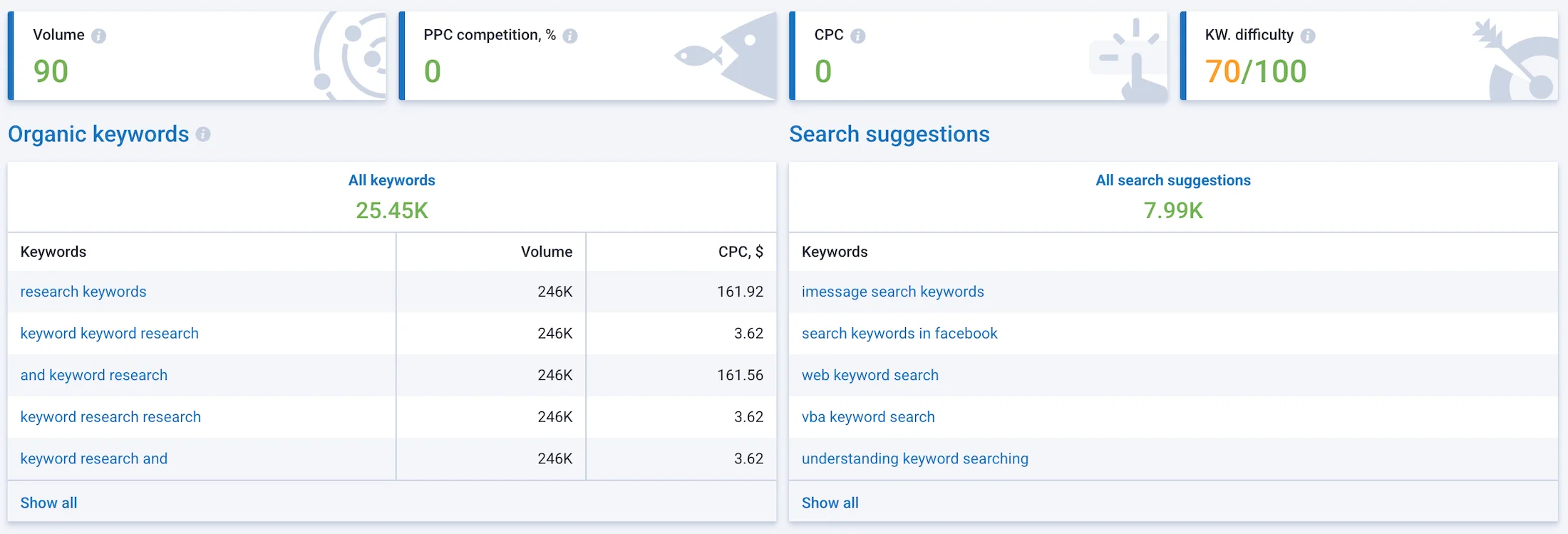
Search Volume: Search volume of 90 searches per month?! This is a fiasco. KeywordStat and Ahrefs show a real cleaned organic volume of 827K, while Semrush inflates it to 2.7M. Serpstat claims that almost nobody searches for this keyword in America. This is a critical parsing error or deep obsolescence of the local search index. If a beginner believes such statistics, they will simply pass by a huge and profitable niche.
It should be acknowledged that for the keyword research keywords, it already returns a more realistic figure of 246K. But why does Serpstat not understand that these words have practically the same intent? And the difference in search volume cannot be so drastic. Let’s write it off as a system bug.
Keyword Difficulty: Difficulty 70 / 100. This is also an Anomaly. While all market leaders unanimously assign a score of 92–100 Maximum difficulty, Serpstat considers breaking into the US top 10 to be moderately difficult. This is a dangerous misconception that can lead to completely wasting the content budget in a niche dominated by corporations.
Cost per Click CPC and PPC Competition: 0. Did I understand that correctly? The tool claims that advertisers do not pay for this traffic at all, although the real CPC in the market fluctuates around $3.50 – $5.04. At the same time, in the left table of related phrases Organic Keywords, the algorithm produces the opposite bug: for the junk query and keyword research, it displays an unrealistic CPC of $161.56, while the search volume for all five random phrases in the list is suspiciously duplicated at exactly 246K. This is very strange.
Interface Usability and Workflow
The Serpstat interface tries to look modern and clean. The top panel with metric cards is fairly easy to read, but when moving to actual work with the keywords, usability suffers significantly.
Interface Advantages: The presence of convenient quick charts showing keyword distribution by difficulty and search volume ranges in adjacent tabs, which helps assess the overall picture of the niche.
Interface Disadvantages: Let’s be honest. The interface looks very outdated. The main dashboard suffers from textual blindness. The Organic Keywords and Search Suggestions modules are presented as huge monotonous tables. There are no quick interactive filters, custom modifiers, or convenient tab switchers, which turns the manual filtering process into a long routine.
Search Intent & AI Features
The main keyword research screen in Serpstat completely lacks Search Intent markers. To understand user logic and separate informational traffic from commercial traffic, the marketer has to export lists and analyze the search results using third-party methods.
Pricing Policy and Limits
Financial affordability has historically been a strong side of Serpstat.
Individual Plan $50/month: Provides basic access to keyword research. With this plan, you are limited to 100 searches per day and 50,000 exported rows per month.
Team and Agency Plans $100 and $410/month: Only here, starting from the mid-tier plan, you get access to API, ChatGPT/Claude integrations, AI analytics, and AI Overview reports. Considering the platform’s performance with keywords in the American market, such an additional cost looks questionable.
8. Ubersuggest: Affordable Popular Software with Distorted SEO Metrics
Ubersuggest started as a simple free utility for parsing Google search suggestions, but after the project was acquired by well-known American marketer Neil Patel, it turned into a full-fledged budget SEO dashboard Ubersuggest.
The service offers basic Site auditing, position tracking, and content idea generation Ubersuggest, but its scoring algorithms often produce rather specific results.
Website: https://neilpatel.com/ubersuggest
Ubersuggest Interface
Data Quality and Anomalies
During our US experiment, Ubersuggest demonstrated the eighth unique data anomaly, clearly illustrating the synchronization issues between algorithms in the budget segment.
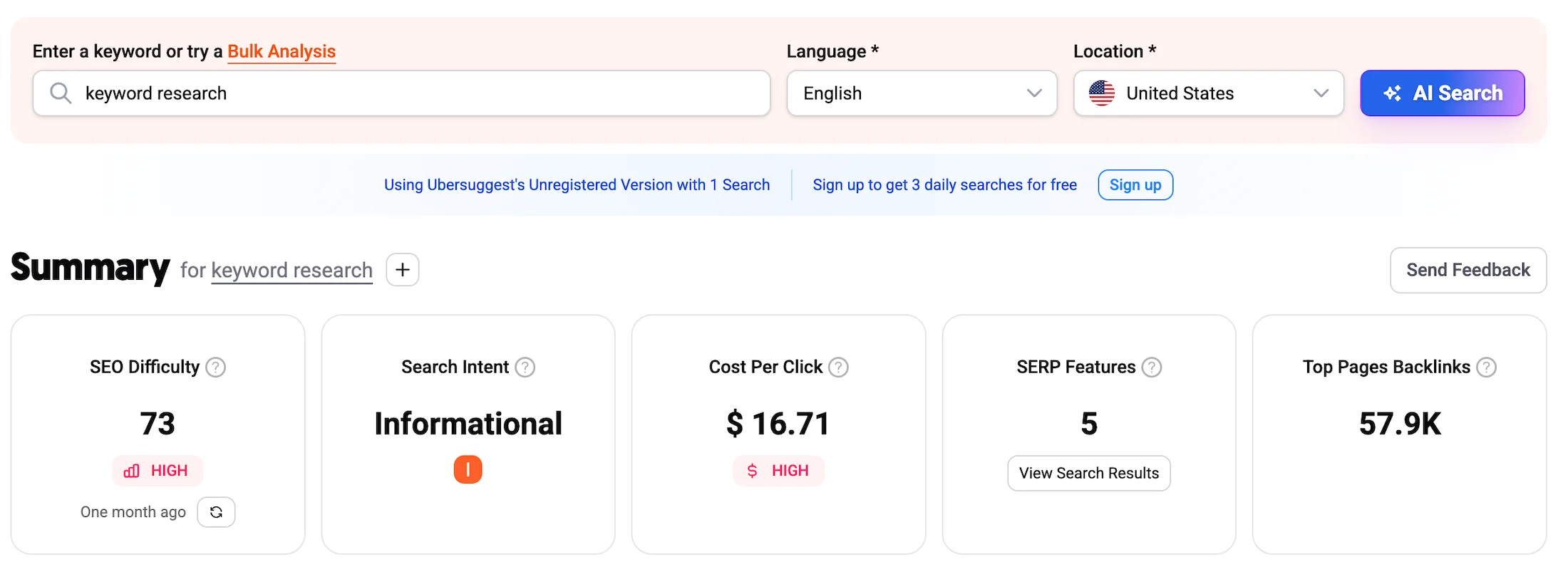
SEO Difficulty: Difficulty 73 / 100 HIGH. What is the danger here? While KeywordStat, Ahrefs, and Semrush unanimously push organic difficulty to the absolute maximum of 92–100, Ubersuggest gives a modest score of 73. For a beginner, this is a false and very dangerous signal: a score of 73 seems manageable, but in reality, Google USA’s organic search results for this query are firmly dominated by authoritative brands. Trying to break into this space with a young Site while trusting this figure is a direct path to wasting the budget.
Cost Per Click CPC: $16.71. Data anomaly. This is the highest CPC indicator among all tested tools. Remember, for most tools, the basic CPC fluctuated around $3.50 – $5.04. The Ubersuggest algorithm pulled the maximum advertising bid for top positions Top of page bid high range and presented it as the average cost per click. At the same time, the competition level indicator $ HIGH directly contradicts their own conclusion about the intent.
Interface Usability and Workflow
The Ubersuggest interface is designed in a bright, modern style and is extremely beginner-friendly. The developers deliberately removed all complex tables, replacing them with clear cards and color indicators.
Interface Advantages: The AI Search button in the upper right is an excellent touch in the spirit of the times. Ubersuggest is actively implementing AI features, allowing you to go directly from the search bar to generating ready-made content plans and briefs for copywriters.
Interface Disadvantages: The professional Workflow suffers significantly here. The keyword ideas block looks rather simple, and the tables do not have instant visual tags for nested phrases. To perform deep filtering and cleaning of the keyword research, the marketer will still have to export the data to external editors.
Search Intent & AI Features
Ubersuggest automatically determines search intent, but in our test, its algorithm fell into the same trap as most competitors: it marked the highly transactional query as purely informational Informational. The tool completely ignored the commercial nature of the keyword, despite the fact that it had itself recorded a giant CPC of $16.71. Advertisers do not pay that kind of money for empty information. Against this background, KeywordStat looks a head above, accurately identifying the dual intent of the phrase.
Pricing Policy and Limits
Affordability is Neil Patel’s main weapon in the fight for customers.
Basic Plan $39/month: An excellent starter plan for working with commercial keywords in the US. You get a limit of 10,000 rows of search results and data exports. The downside is that AI tools for brand monitoring and visibility optimization are completely blocked.
Pro + AI and Team Plans $59 and $249/month: These plans unlock completely unlimited search and unlimited data exports without hidden limits. The Pro + AI plan also adds ChatGPT integration and 10 projects for tracking Sites.
9. Keyword Tool: Multichannel Autocomplete Parser with Smoothed Google API Data
Keyword Tool works as an automatic collector of suggestions from the Google Autocomplete search bar. It takes a base keyword, adds letters of the alphabet, numbers, and question prepositions to it, extracting hundreds of hidden Long-Tail phrases from the depths of the search engine that users are entering right now.
Website: https://keywordtool.io
Keyword Tool Interface
Data Quality and Anomalies
During our cross-test for the United States region, this tool demonstrated the ninth unique data anomaly, clearly exposing the main vulnerability of raw integrations with Google Ads.
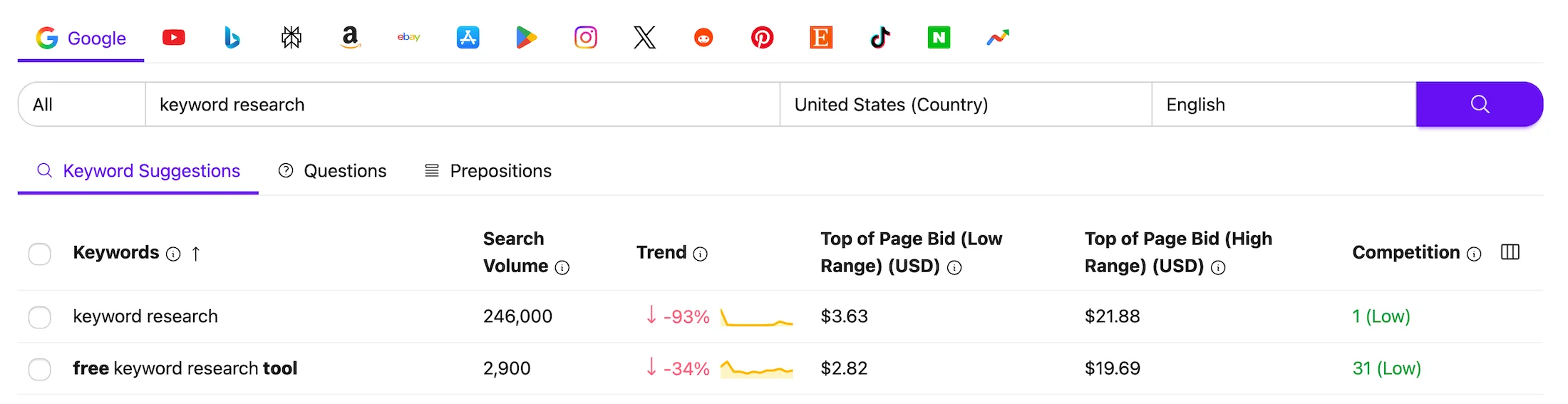
Search Volume: Search volume in the US: 246,000 searches per month. What is the intrigue here? Look at how strongly raw Google API data underestimates the reality of organic search. We saw similar figures with SE Ranking at 368K and KWFinder at 232K. Since Google Keyword Planner combines closely related variations, for example, keyword research, key word research, doing keyword research, into common buckets for advertisers, its official statistics show a conservative 246K. Professional databases such as KeywordStat and Ahrefs clean this data using Clickstream histories from millions of real users and see the true picture: 827K, a difference of more than 3 times!
Trend: -93%, declining trend. This is a critical error. The Keyword Tool Pro chart shows a sharp, catastrophic decline in the popularity of the phrase in the US. No other tool, including Google Trends and KeywordStat, confirmed this. This is a classic Google Ads API technical bug, where, during database updates, the algorithm incorrectly matches historical data from previous periods. For a marketer, this is a trap: blind faith in such a chart can make you abandon a growing niche.
Top of Page Bid: PPC bids $3.63 Low – $21.88 High. The monetary data matched WordStream down to the cent and almost perfectly matched KeywordStat at $3.50, demonstrating an accurate range of click prices in the American market.
Competition: Advertising competition 2 Low. It is important to remember that the Competition metric here does not show the difficulty of organic SEO KD, but rather the density of competition among advertisers. That is why the green “Low” status is displayed: there are few brands buying this word directly through paid advertising, since everyone is promoting through content marketing. The tool cannot assess the organic difficulty of getting a Site into the top results.
Interface Usability and Workflow
The Keyword Tool Pro interface is a benchmark of minimalist simplicity and high functionality. There are no heavy charts, backlink tables, or competitor domain analytics here.
Interface Advantages: An impressive multichannel panel at the top. With one click, you can switch keywords collection from Google to YouTube, Bing, Amazon, eBay, Apple App Store, Instagram, and TikTok. For e-commerce projects promoting products on Amazon USA or content creators targeting YouTube, this is the best UI on the market.
Convenient Navigation: All results are neatly divided into three tabs: Keyword Suggestions, Questions, and Prepositions. The dashboard works extremely fast, and the data is easy to filter and export.
Search Intent & AI Features
Keyword Tool Pro completely lacks algorithms for automatically determining Search Intent for phrases and built-in AI clustering. The tool provides a raw, although excellently filtered, list of autocomplete suggestions. To understand which of the 1,000 discovered phrases have commercial value and which are informational, the specialist has to do it manually, reviewing each line, which is significantly inferior to the intelligent tagging capabilities of competitors.
Pricing Policy and Limits
The service’s pricing policy is one of the most controversial and unjustifiably expensive on the market, considering the software’s narrow specialization.
Basic Plan $39/month: An excellent starter plan for working with commercial keywords in the US. You get a limit of 10,000 rows of search results and data exports. The downside is that AI tools for brand monitoring and visibility optimization are completely blocked.
Pro + AI and Team Plans $59 and $249/month: These plans unlock completely unlimited search and unlimited data exports without hidden limits. The Pro + AI plan also adds ChatGPT integration and 10 projects for tracking Sites.
Overpaying this much for a simple autocomplete parser when alternatives are available is an extremely questionable decision for any marketer.
10. Keywords Everywhere: Keyword Research on the Fly
Why on the fly? Because it was originally a Chrome extension designed as a tool for quickly brainstorming ideas. Now the Keyword Finder functionality from Keywords Everywhere is also available on the web.
The algorithm works as follows: it takes your main query and automatically combines it with 40 predefined commercial and question modifiers such as best, top, vs, free, how to, instantly filtering out empty informational noise and leaving only hot phrases for business.
Website: https://keywordseverywhere.com
Keywords Everywhere Interface
Data Quality and Anomalies
In our US cross-test, the tool demonstrated the tenth and deepest data anomaly, clearly exposing the specifics of how commercial parsers work.
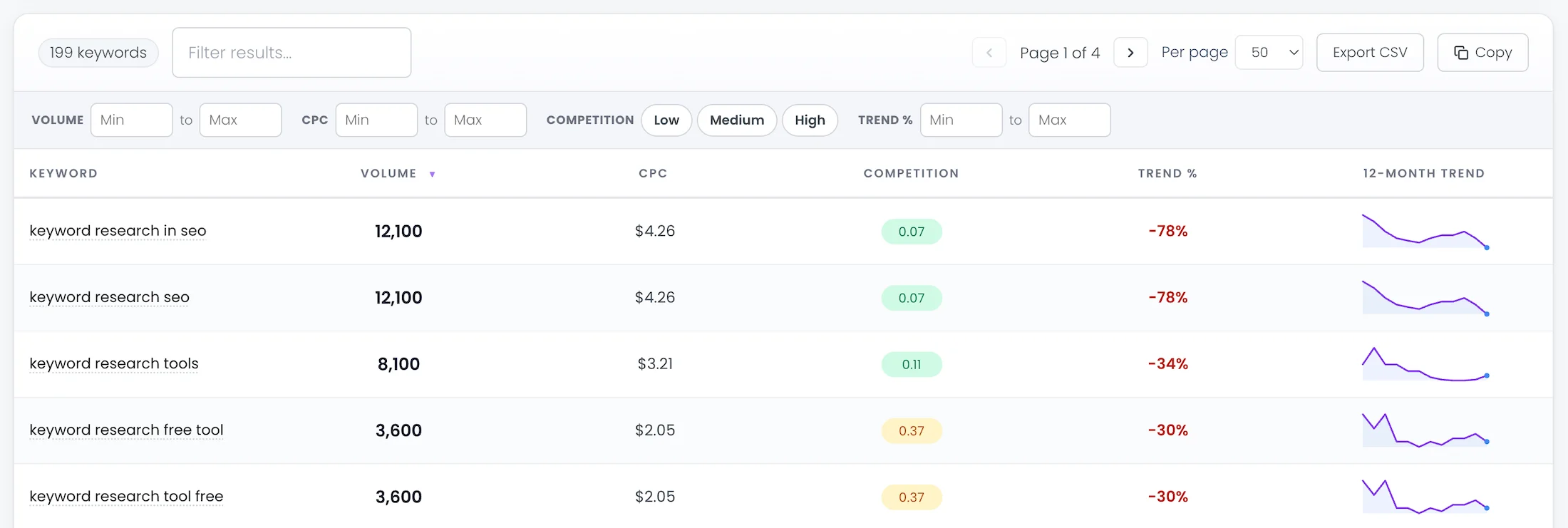
Search Volume: Search volume for keyword research in seo: 12,100, keyword research tools: 8,100.
What is the intrigue here? Look at the screenshot. Unlike the other participants in the test, Keyword Finder does not display metrics for the root keyword keyword research directly. Instead, it immediately shows the search volume of its embedded long-tail variations. The figure of 8,100 searches for the phrase keyword research tools perfectly matches the values from professional databases KeywordStat and Ahrefs, confirming the high accuracy and reliability of their API.
Trend %: Trend dynamics: a decline of -78% and -34%. This is a critical error. We are catching the same Google Ads API bug again as with Keyword Tool Pro. The tool shows a sharp annual decline in interest in commercial queries in the US. This once again proves that utilities that blindly transmit raw Google Ads data without their own smoothing algorithms and historical cache often scare marketers with artificial declines out of nowhere.
Competition: PPC competition 0.07 and 0.11. Instead of vague textual ratings such as Low/High, the tool displays an exact numerical coefficient for ad density in Google Ads from 0.00 to 1.00. A value of 0.07 is extremely low, indicating that major brands in the US prefer to capture this traffic through content SEO rather than direct paid advertising. This tool is unable to assess the difficulty of getting a Site into the organic top results KD.
Interface Usability and Workflow
The Keyword Finder interface is an example of excellent utilitarian UX design without unnecessary clutter. Results load instantly and are presented in a clean, neat table.
Interface Advantages: Perfect quick filters at the top. The filtering panel is exceptionally well designed. With one click, you can filter keywords by minimum Volume, CPC, choose a specific numerical level of advertising competition, or filter phrases by trend dynamics. The panel includes familiar quick buttons for Copy and instant export to Excel Export CSV.
Interface Disadvantages: The tool is completely autonomous and disconnected from broader SEO analytics. There is no project manager, position tracking, or competitor page analysis here. It is strictly a one-time parser for quickly building a list of phrases.
Search Intent & AI Features
Keywords Everywhere has no automatic AI intent tagging or built-in clustering. The division into informational and commercial query types is performed through rigid filters based on word modifiers that you configure yourself. In terms of convenience and process automation, this is significantly inferior to the built-in artificial intelligence in KeywordStat, which distributes keywords into clusters and intents with one click.
Pricing Policy and Limits
Affordability and a unique payment system are what made the Keywords Everywhere brand legendary.
Bronze Plan: $7/month when paid annually. You get 100,000 credits per year and access to the basic features of the Keywords Everywhere extension.
Silver, Gold, and Platinum Plans: from $14 to $120/month. The packages expand the annual limits from 400,000 to 8 million credits and provide access to the SEO Minion tool for team work with Keywords Everywhere. An excellent alternative if you are looking for a flexible payment system.
11. Wordtracker: An Independent Patriarch of the SEO Market with a Unique KEI Index
Wordtracker is one of the oldest and most respected tools on the Western digital market, existing since the late 1990s wordtracker. While 99% of the modern software market blindly copies and transmits data from the Google Ads API, Wordtracker deliberately follows its own path.
It collects keywords from a huge independent database of search logs and alternative search engines, helping marketers discover hidden commercial niches that Google deliberately smooths out or groups together.
Website: https://wordtracker.com/
Wordtracker Interface
Data Quality and Anomalies
In our US cross-test, this tool demonstrated the eleventh unique data anomaly, clearly illustrating its conservative and strict approach to calculations.
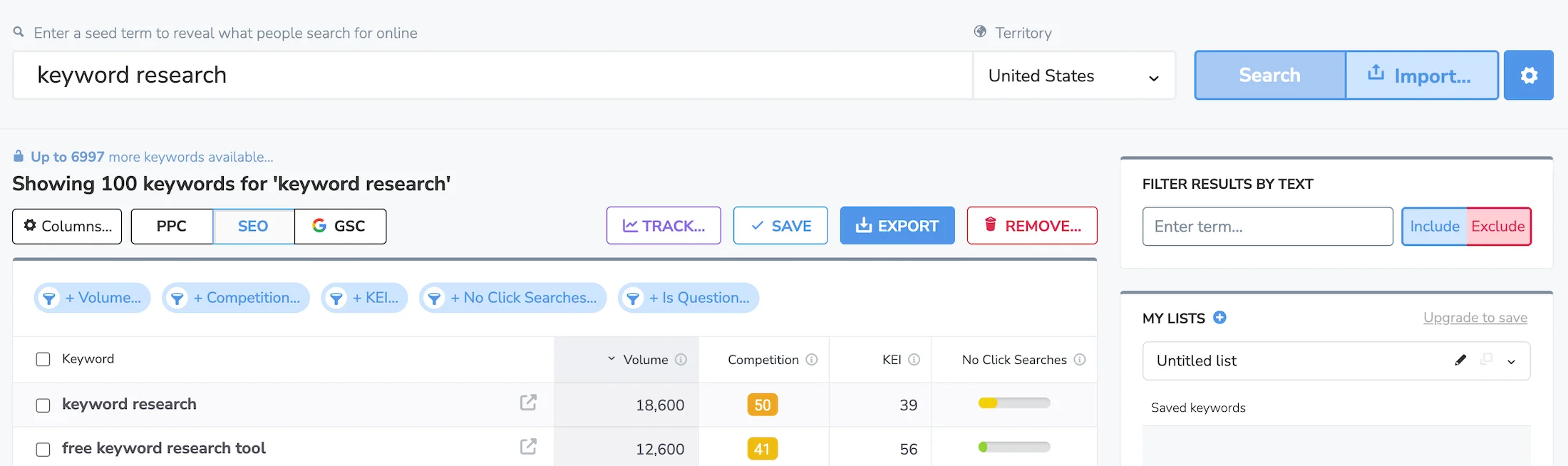
Search Volume: Search volume in the US: 18,600 searches per month. What is the intrigue here? Look at this figure! Both KeywordStat and Ahrefs show a broad organic search volume of 827K, while Semrush inflates it to 2.7M. Wordtracker records a modest 18.6K.
Why does this happen? The tool does not try to guess or artificially inflate the numbers using advertising forecasts. It shows exclusively clean, exact Exact Match matches from its own recorded database. This gives the marketer an extremely grounded, strict, and realistic assessment of baseline demand without taking into account Google’s hidden Google Ads grouping algorithms.
Interface Usability and Workflow
The Wordtracker interface is designed in a strict, academic style. It may seem a little old-school, but the workflow management logic here is thought through down to the smallest detail.
Smart Filter Tags: The instant filtering panel at the top is implemented excellently. The + Volume, + Competition, + KEI, + No Click Searches, and + Is Question buttons allow you to filter out empty phrases with one click and, for example, extract only question queries with a low percentage of zero-click searches.
Multi-Modes: The PPC, SEO, and GSC switches allow you to instantly rebuild the dashboard for the required tasks: advertising, organic search, or Google Search Console integration.
Search Intent & AI Features
Wordtracker does not have automatic AI intent tagging for phrases like the leader of our ranking. Query types are separated through manual configuration of modifier filters. However, the tool offers two other unique metrics that completely compensate for this drawback.
KEI Metric: Keyword Effectiveness Index 39. The effectiveness index compares search volume with the level of competition. A score of 39 indicates that promoting the main keyword is commercially justified, but it will require enormous effort.
No Click Searches: Low. The indicator clearly visualizes the percentage of users who enter the query in the US but leave the search results without clicking any link, for example, after reading a quick answer from AI or a Google Snippet. Understanding this metric is a huge advantage before buying advertising or writing an article.
Pricing Policy and Limits
Wordtracker offers a classic subscription model aimed at professional market researchers and agencies.
Bronze Plan: $17/month or $195 per year. Budget-friendly independent search. Provides 500 searches per day and up to 1,000 results per search.
Silver and Gold Plans: $38 and $54/month. These plans expand the limits to 1,000 and unlimited searches per day, while also providing integration with Google Search Console.
This is a very affordable solution for finding niche Exact Match keywords.
12. Moz Keyword Explorer: An Old Tool in the Industry with Unique CTR Scoring
Moz Keyword Explorer is a tool from one of the oldest brands in the global SEO industry, which once gave the market the fundamental Domain Authority DA and Page Authority PA metrics.
Moz’s keyword research module has its own independent US database, but its algorithms produce rather specific results that tend to be overly cautious.
Website: https://moz.com
Moz Interface
Data Quality and Anomalies: US Test
Our cross-test examined Moz data.
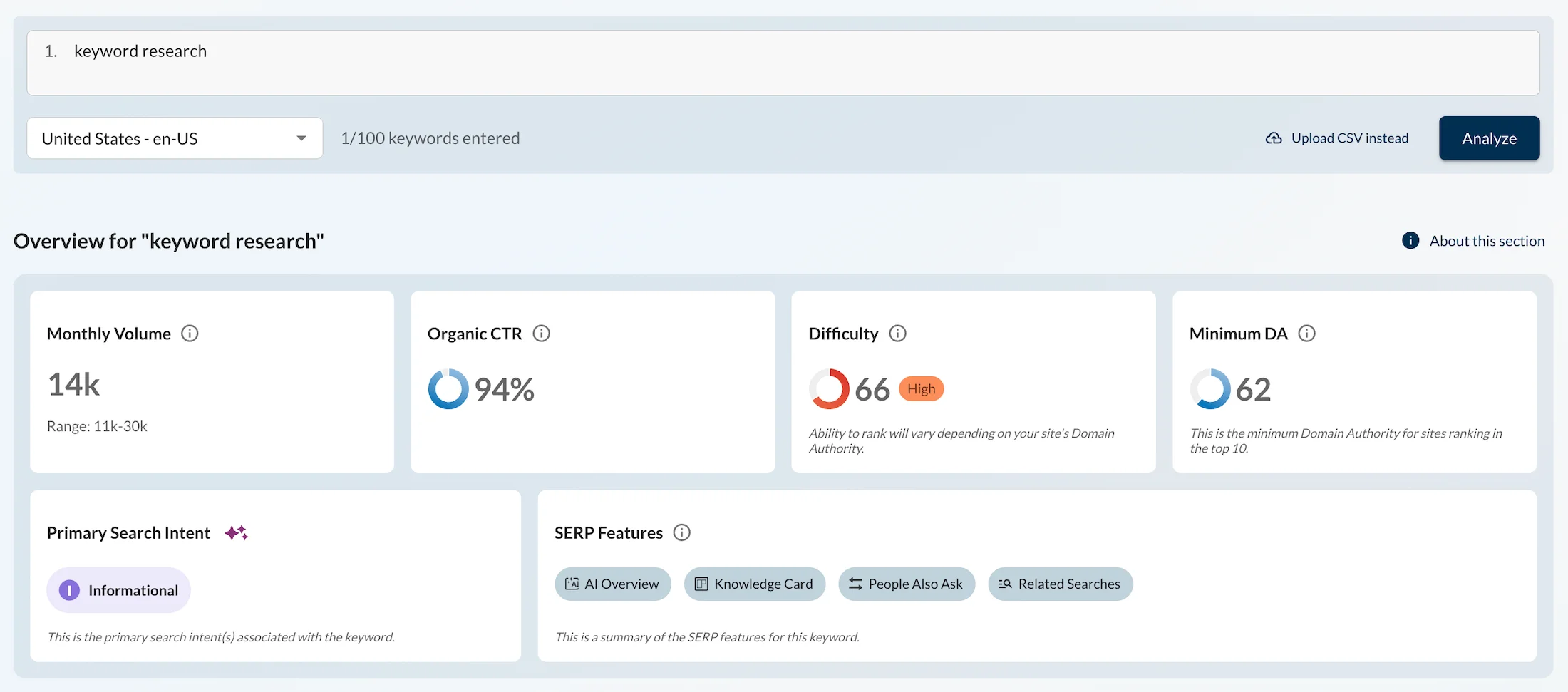
Monthly Volume: Search volume 14k, range 11k–30k. Moz records a baseline volume of just 14,000 searches per month. Do you remember the data from the other tools?
Why does this happen? Moz uses strict Volume Ranges algorithms based on its own logs, completely ignoring Google advertising groupings.
But in this case, they played it so safe that they cut the search volume of the main SEO keyword far below reality. This is a critical insight: for a guide, blindly trusting Moz can make you think that the niche has tiny potential.
Difficulty: Difficulty 66 High. The Moz algorithm showed surprising leniency by assigning a difficulty score of 66. While Ahrefs and KeywordStat estimate getting a Site into the top 10 in the US at 92–94 points, Moz considers the task moderately difficult.
Minimum DA: Minimum Domain Authority 62. This metric, however, brings us back to reality. The tool honestly warns that to enter the Google USA top 10 for this keyword, your domain authority Domain Authority must be at least 62. This clearly proves that the difficulty score of 66 is misleading: the niche is burned out.
Interface Usability and Workflow
The Moz Keyword Explorer interface is designed in a clean, modern card-based widget style. It is pleasant to look at, but suffers from low information density.
Interface Advantages: The design is not overloaded with table clutter. The SERP Features block immediately highlights which elements are present in the Google search results for this keyword in the US: AI Overview, Knowledge Card, People Also Ask, and Related Searches. This helps quickly assess the structure of the search results page.
Interface Disadvantages: The cards take up too much screen space. To move into deeper work with nested keywords, you have to constantly scroll and switch between isolated tabs, which significantly slows down the daily Workflow.
Search Intent & AI Features
Moz automatically determines user intent, but in our test, its algorithm fell into the same trap as Semrush and SE Ranking. It marked the transactional keyword as purely informational Primary Search Intent Informational, completely ignoring its commercial value.
At the same time, Moz has a powerful trump card.
Organic CTR: 94%. The tool provides a unique click-through rate forecast. According to its data, despite the abundance of AI answers and advertising, organic search results for this keyword in the US capture an incredible 94% of clicks. And if this is the case, then this is an incredibly valuable metric for assessing the actual return from SEO promotion.
Pricing Policy and Limits
Moz’s pricing policy is one of the main reasons why the tool is losing popularity among independent marketers.
Standard Plan: $99/month. A starter plan for 1 user, limited to 300 keywords for tracking per month.
Medium and Large Plans: $179 and $299/month. With the Medium plan, the limit expands to 1,500 keywords and full AI analytics AI Overviews, 100 AI prompts become available.
The Moz platform imposes a huge technical ecosystem on content marketers, making it too expensive for pure keyword research.
Comparison Table: Best Keyword Research Tools
| № | Tool | Volume Accuracy | Intent Assessment | Price / Month | Price / Year / Lifetime, Start | Limits and Features, Start |
|---|---|---|---|---|---|---|
| 1 | KeywordStat | High | Fully displayed immediately in cards | $9 / month | $6.75 / month, $81/year | 100 analyses/day, up to 5k keywords, AI clustering |
| 2 | Semrush | Overestimated | Fully displayed immediately on the main page | $139 / month | $117.33 / month | 5 Sites, 500 keywords, SEO/PPC researcher, AI Search |
| 3 | Ahrefs | High | Fully displayed immediately as labels in the results | $129 / month | $99 / month | 5 projects, 750 keywords, 1,000 credits/user |
| 4 | SE Ranking | Underestimated | Partially, requires opening a report | $129 / month | $103.20 / month | 10 projects, 2k keywords, AI tracking, 25k API credits |
| 5 | KWFinder | Underestimated | Fully displayed immediately as labels in the list | $49 / month | $37.70 / month | 100 checks/24h, 200 keywords/query, AI Search Watcher |
| 6 | SpyFu | Significantly underestimated | Partially, only indirectly through PPC | $39 / month | $29 / month | 10k result rows, 10k exports, 1 project, 10+ years of history |
| 7 | Serpstat | Critically underestimated | Partially, requires enabling the column | $59 / month | $50.00 / month | 5 projects, 100 checks/day, 10k positions, basic audit |
| 8 | Ubersuggest | Data hidden | Fully displayed immediately in the table | $29 / month | $290 lifetime | 1 project, 150 searches/day, 125 keywords, ChatGPT/Gemini |
| 9 | Keyword Tool Pro | Underestimated | Absent | $85 / month | $68.00 / month | 50 searches/day, parsing 16 platforms, YouTube, TikTok |
| 10 | Keywords Everywhere | Significantly underestimated | Absent, manual analysis only | $7 / month | $84 / year | 100k credits/year, 1 user, Top-1000 parsing on Sites |
| 11 | Wordtracker | Significantly underestimated | Absent, manual analysis only | $29 / month | $17.00 / month | 500 searches/day, 1k results/query, No-Click metric |
| 12 | Moz Explorer | Range-based | Fully | $99 / month | $79.00 / month | 1 user, 3 Sites, 300 keywords, AI Overviews, Organic CTR |
Other Keyword Generators
If you need more alternatives, free Google tools, specific marketplace data, or a quick express assessment, these services will be an excellent addition to your main working environment.
Official and Free Tools from Google
Google Keyword Planner: The Official Source with an Advertising Focus
This is Google’s official database. All paid SEO services consult it to some extent or use its API.
Website: https://business.google.com/en-all/ad-tools/keyword-planner
Data Features: The tool is indispensable for assessing the commercial potential of a niche and the cost per click. However, it is inconvenient for SEO specialists because it was created exclusively for PPC advertising. Because of this, the algorithm heavily groups and blurs the exact search volume for similar words and combines closely related phrases, hiding the real organic picture.
Price: Completely free inside the Google Ads advertising account.
Google Trends: The Main Tool for Seasonality and Trend Analysis
An official Google service that is essential for verifying any collected keywords.
Website: https://trends.google.com
Data Features: It does not provide exact search volume figures, but shows the relative popularity of a query on a scale from 0 to 100 in real time. It is indispensable in the US market for identifying seasonal spikes, for example, Black Friday, and checking whether a niche is dying or, conversely, is a rapidly growing AI trend.
Price: Completely free.
Question Parsers and Content Marketing Tools
AnswerThePublic: Creative Visualization of Search Questions
An excellent tool for finding informational and question-based keywords, perfectly suited for filling FAQ sections according to modern Google requirements.
Website: https://answerthepublic.com
Data Features: It turns standard Google search suggestions into branching, interactive circular maps of questions: what, where, when, how, why, that users ask in the US.
Price: There is a heavily limited free allowance of 3 searches per day; paid plans became quite expensive after the service was acquired by Neil Patel.
AnswerSocrates: Free Alternative for Finding Questions
An excellent alternative to AnswerThePublic, created to help content creators.
Website: https://answersocrates.com
Data Features: The tool combines data from Google autocomplete, “People Also Ask” blocks, and search prepositions for specific countries, including the US. It provides clean lists of real questions without heavy graphical animation, which speeds up the process of copying phrases into content briefs.
Price: Be careful, this is not 100% free. There is both a trial and paid plans. The cheapest starts at $15 per month, with a discount available when purchasing annually.
AlsoAsked: Deep Analyzer of “People Also Ask” PAA Blocks
This highly specialized tool is indispensable for designing the architecture of content articles.
Website: https://alsoasked.com
Data Features: Instead of search volumes, it parses the dynamic “People Also Ask” block in Google for the US and builds a hierarchical tree map of questions. This helps understand how one user intent flows into another, allowing you to create the ideal subheading structure.
Price: From $15 per month, with a limited free trial.
QuestionDB: Parser of Live Discussions from Reddit and Quora
It searches for keywords where the Google Ads API does not see them, using logs from real topics on the largest American discussion platforms.
Data Features: It finds the most honest, unpolished by SEO optimization questions from users. This is an ideal source of blog topics that your competitors, who analyze only standard software, will never discover.
Price: There is an excellent free plan with up to 50 results per search; the Pro plan costs $15/month.
Niche SEO Tools
Keyword.io: Multichannel Scraper
A specialized parser created for specialists working with product niches and alternative search engines.
Website: https://www.keyword.io
Data Features: Allows you to collect search suggestions not only from Google, but also from closed databases of Amazon, eBay, Alibaba, Etsy, YouTube, and Flickr. Indispensable for e-Commerce projects in the US promoting products on marketplaces.
Price: There is a basic free version; the Pro plan with access to search volumes starts at $29/month.
Keysearch: A Budget Tool for Indie Hackers and Bloggers
A simple but very solid specialized web service, often chosen by owners of content Sites in the US as an alternative to KWFinder.
Data Features: Provides a decent Keyword Difficulty Score, collects lists of LSI queries and suggestions, and also contains a built-in module for basic competitor analysis.
Price: Very affordable pricing starting at $17/month, which makes it popular among beginners.
WordStream Keyword Tool: Free Keyword Tool for SEO and PPC
A service from the well-known American marketing agency WordStream, created primarily for advertising specialists.
Website: https://www.wordstream.com/keywords
Data Features: As our experiment showed, the tool blindly copies the smoothed and grouped search volume from Google Ads, returning 246K for our test keyword, but at the same time it is perfectly suited for a quick express check of the PPC click price range in the US market on the fly.
Price: Completely free.
Keyword Research Tool by Similarweb: Enterprise Traffic Analytics
A keyword research module within the powerful Similarweb analytics platform, aimed at large B2B businesses at the Enterprise level.
Website: https://www.similarweb.com/corp/search/keyword-research
Data Features: Provides unique data on the actual distribution of traffic between Sites based on huge Clickstream user monitoring panels.
It allows you to see exactly which company captures the lion’s share of clicks for a specific query in the US, separating paid, organic, and branded traffic with extremely high accuracy.
Price: The tool is part of the overall Similarweb platform, whose price is calculated individually and starts at several hundred dollars per month, making it unavailable to ordinary webmasters. Unfortunately, no trial plans are provided. Therefore, we were unable to test this tool. That is why it is at the end of our list.
Testing Methodology
How We Conducted the Audit
Test Keywords Query: keyword research. Region: United States, Desktop.
Unified Data Collection Time: 2026, on the same day.
Evaluation Criteria:
- Search Volume discrepancy: comparison of Clickstream data and raw Google Ads API exports.
- Intent recognition accuracy: checking for the presence of commercial and informational labels.
- Workflow automation: speed and quality of keyword grouping without using third-party software.
- Pricing transparency: calculation of the actual cost of use without hidden expenses for limits or credits.
Which Tool Should Each Specialist Choose?
For Content Marketers
Recommendation: KeywordStat $9/month or KWFinder $37.70/month.
KeywordStat provides unlimited AI clustering of articles into ready-made briefs for content creators without unnecessary overpayments.
KWFinder is excellent for quickly finding low-competition Long-Tail phrases with weak search results.
For PPC Specialists
Recommendation: SpyFu $29/month or Semrush $117.33/month.
SpyFu provides unlimited access to the history of competitors’ Google Ads campaigns and their ad copy for 10+ years.
Semrush provides comprehensive analysis of budgets, PPC keywords, and positions in product listing ads PLA.
For SEO Specialists or Link Builders
Recommendation: Ahrefs $108/month or Semrush $117.33/month.
High accuracy of volume estimates based on Clickstream data. Accurate calculation of the referring domains required to reach the top 10 and the best backlink index on the market.
For Amazon / Etsy / YouTube / TikTok E-Commerce Projects
Recommendation: Keyword Tool Pro $68/month or Keyword.io.
A specialized parser that collects closed autocomplete search suggestions from 16 multichannel platforms, including Amazon, eBay, App Store, YouTube, and TikTok, which are unavailable in traditional SEO services.
Step-by-step Workflow for Keyword Research in 2026
Collecting the Base Keyword and Expanding It
The process begins by entering Seed Keywords into KeywordStat or Ahrefs to obtain an initial list.
If you already have an active project, to avoid missing hidden queries, the initial dataset is enriched from two sources.
Google Search Console / GA4: export implicit keywords with a high number of impressions but low CTR, for which your Site already ranks in positions 11–30.
Competitor Analysis
In Semrush or SpyFu, parse the Top pages of direct competitors in the niche to capture their highest-traffic keywords.
At this stage, the garbage is also removed: zero-volume phantoms, irrelevant geo-tail queries, and competitors’ branded queries if a separate review or comparison is not being prepared for them.
Intent Assessment and Distribution Across the Funnel
The collected dataset is processed through intent classifiers with a clear separation of phrases according to the architecture.
Informational queries should be used for the blog content plan, knowledge base, and expert guides.
Commercial and transactional queries are distributed across catalog categories, lead-generation landing pages, and product pages.
The CPC metric is used as a commercial filter: a high cost per click in Google Ads indicates a high conversion potential of the query in organic search, even if its raw Search Volume is not large.
Keyword Clustering
Method A: Automatic AI / SERP-based
Upload the list to SE Ranking or Serpstat. The service will parse the Google Top 10 for each query and compare matching URLs.
KeywordStat automatically groups keywords directly during the search process.
When there are 3–5 common Sites in the search results, the algorithm automatically combines the keywords into one cluster, identifies the main high-volume keyword, and generates a list of LSI words.
Method B: Manual Google Sheets / Excel
Sort the dataset by descending Search Volume: the top phrase defines the topic of the group. Filter the list by basic masks such as buy, price, how to choose.
If you have doubts about whether different keywords should target the same page, enter them into neighboring Google tabs. Identical search results mean one cluster, while fundamentally different types of Sites indicate the need to create separate pages.
Cannibalization Check
Before approving the cluster, enter its main keyword into search with the operator siteyourdomain.com. If you already have an indexable page on this topic, the new cluster should be attached to it as a content expansion rather than created from scratch.
Assessing KD Difficulty and Traffic Potential
Before sending a cluster into development, evaluate the Keyword Difficulty indicator and the strengths of the current Top 10.
For young domains, priority should be given to low-competition Low-KD clusters. Additionally, check competitors’ backlink profiles Ref. Domains through Ahrefs to plan the outreach and backlink budget in advance.
Validation Through Google Trends and AI Overviews
Check demand dynamics in Google Trends to exclude seasonal declines or fading trends.
Be sure to enter the main keyword into Google and evaluate the search results. If the upper part of the screen is occupied by an AI Overviews SGE block or a Featured Snippet quick answer, be prepared for the actual organic CTR to be 30–40% lower than the nominal Search Volume due to Zero-Click Searches.
Structure Design and Content Brief
The final step of the workflow is linking clusters to the Site tree and assembling the content brief. For each page, define:
- Target Title, Description, and H1.
- Logical H2–H3 subheading structure based on secondary keywords from the cluster.
- A list of mandatory LSI terms and thematic Entities for natural integration into the text.
FAQ
Why does the search volume for the same keyword differ by 3–4 times across different services?
What is Clickstream data and why is it more accurate than Google Keyword Planner?
How does the appearance of AI Overviews SGE blocks in Google affect keyword research?
What is the difference between classic clustering and AI clustering?
AI clustering additionally analyzes semantic intent, LSI, topic, and query context using language models. This makes it possible to create more natural, content-brief-ready clusters without the risk of spamming a page with identical synonyms.
Can you build a high-quality keywords for free or using trials?
Do you need to pay $100+ for Ahrefs/Semrush if you only need keyword research?
Final Verdict: How to Choose a Keyword Research Tool
The keyword research tools market has finally split into two categories: heavy multifunctional platforms and highly specialized keyword research services.
Trying to use one universal tool for absolutely every task most often leads either to enormous overpayments or to a loss of data accuracy.
How to Build an Effective Toolset for Your Tasks and Budget
For Targeted Content and Keyword Work
If your main task is fast keyword research, accurate intent identification, and AI clustering of articles without overpaying for unnecessary functionality, KeywordStat or KWFinder will be the optimal choice. It covers the key needs of content teams and solo specialists while saving budget.
For In-Depth Backlink Analytics and Complex Search Results
If you are engaged in hardcore SEO, technical audits of large portals, and link building, Ahrefs and Semrush remain the industry standard due to the highest accuracy of Clickstream data and the best backlink database.
For PPC Specialists and Competitive Creative Analysis
For contextual advertising and ad-buying tasks, Semrush and SpyFu remain the leaders, providing deep histories of advertising campaigns and ad-buying volumes.
For Working with Multichannel Marketplaces
When promoting on Amazon, YouTube, TikTok, or the App Store, standard SEO parsers are inferior to specialized solutions such as Keyword Tool Pro, which can retrieve closed search suggestions from e-commerce platforms.
The main trend in modern keyword research is moving away from routine Excel processes toward a hybrid approach that combines the accuracy of Clickstream data, automatic AI clustering based on SERP, and mandatory consideration of AI Overviews SGE when forecasting actual traffic.